Symptom
A Microsoft 365 or Entra ID backup fails with the error:
| The resource principal '{resource principal name}' was not found in the tenant '{tenant name}'. This indicates that the application has not been installed by the administrator of the tenant or has not been consented to by any user in the tenant. Please install the application, grant the necessary permissions, and authenticate to the correct tenant. |
Cause
For our system to be able to backup Microsoft 365 data, an application called Redstor Cloud Backup must be installed for each Microsoft 365 service by a global administrator of the tenant, and at least one user (any user) in the tenant must consent to the use of the application. This also applies to Entra ID.
This application serves as the resource principal and is essential to the backup process. If the installation and consent requirements are not met, our system will be unable to backup the data in the related backup set, resulting in this error.
Solution
Your first step should be to check the affected backup set in the RedApp. A banner may be visible at the top of the backup set overview, asking you to re-authenticate. Doing this will re-grant consent for our application to access your M356 tenant, which is likely to resolve the issue.
If no banner is visible in the RedApp, follow the steps below to ensure our application has the necessary access.
1. Log into the Azure Portal as a global admin user.
2. Open Azure Active Directory.
3. Under Manage, click on Enterprise applications.
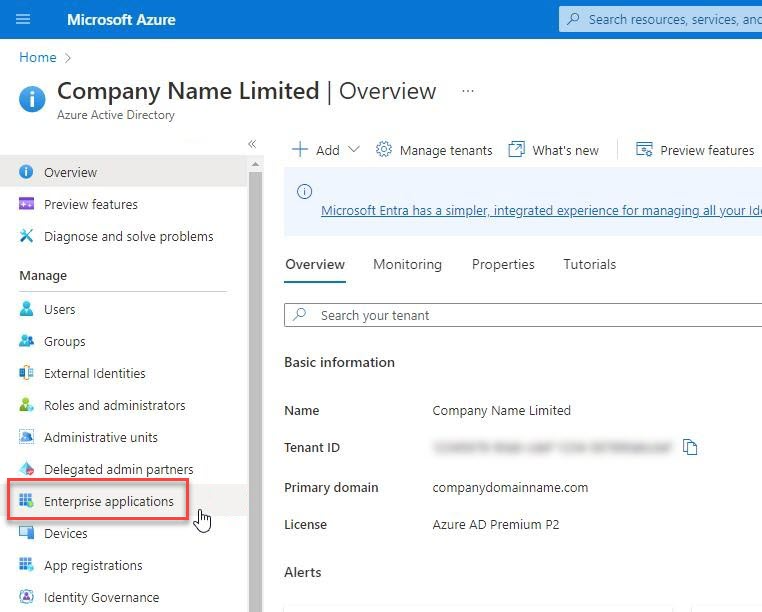
4. Check that an application named "Redstor Cloud to Cloud" is present for each Microsoft 365 service you want to backup, e.g. "Redstor Cloud to Cloud" – Teams Backup” for Teams.
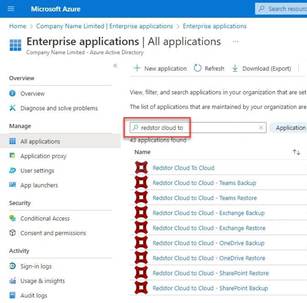
If this application is not present for a specific service, you will need to remove and re-add the backup set for this service (in this case Teams) in the RedApp. Ensure that you are authenticating with the appropriate M365 global administrator role during setup in the RedApp.
5. Once you have re-added the backup set, run a backup. If you still get the same error, log a support ticket.
Was this article helpful?
That’s Great!
Thank you for your feedback
Sorry! We couldn't be helpful
Thank you for your feedback
Feedback sent
We appreciate your effort and will try to fix the article